Technology / Side-by-side comparison / US models
Aura Carver Mat vs Skylight Frame 2
Give them more than another photo on your phone. Choose a frame your family can keep filling with new memories—and a display that suits their home.
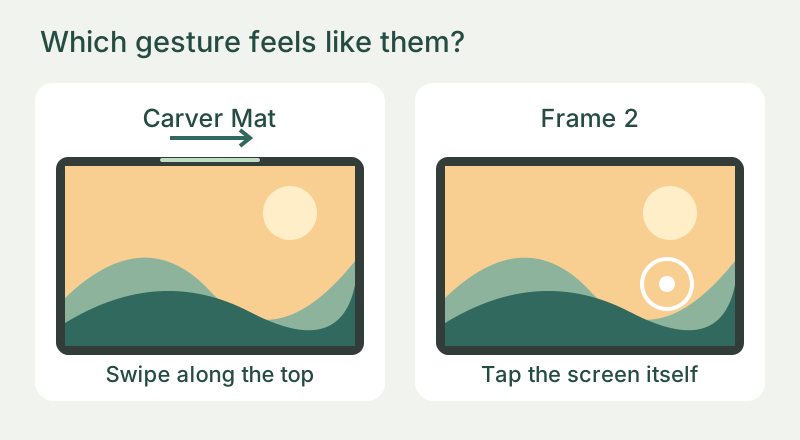
Both support email contributions. Aura also lists text sharing in the US and Canada. The useful question is not simply “can relatives send photos?” but which display and controls suit the person receiving them.
We may earn a commission if you buy through these links.
Choose it for the matted look
Aura Carver Mat
- Keep the plan simple. Cloud storage is included without an annual subscription.
- Give relatives ways to contribute. App, email and US/Canada text sharing let family use a method that fits them.
- Make portrait photos work side by side. Photo pairing uses the landscape display for two vertical images.
Skip it if: you need a screen you can position vertically. Carver Mat stays landscape.
Check Carver Mat price on AmazonChoose it for touch controls and trim
Skylight Frame 2
- Use controls on the display. Tap the screen itself to interact with Frame 2. Carver Mat also has on-frame controls, using a touch bar along the frame rather than a touchscreen.
- Change the outer look. Swappable Snap Frames offer trim choices; check which one is included.
- Choose extras separately. Base use does not require Plus; add a plan only for features you actually want.
Skip it if: you want the listed Plus management extras but no recurring bill. Check the plan and feature note below.
Check Frame 2 price on AmazonThe differences worth deciding on
| What matters to you? | Aura Carver Mat | Skylight Frame 2 |
|---|---|---|
| Included service or optional extras? | Cloud storage included; no subscription. | Base use without Plus. Management extras available through optional Plus. |
| How do you want to interact? | Swipe the touch bar to change photos; use the app to manage the collection. | Touchscreen controls on the frame. |
| Which look fits the room? | Matted border; landscape-only display. | Swappable Snap Frames; exact trim depends on offer. |
| What are the screen specifications? | 10.1-inch, 1280 × 800. | 10-inch, 1920 × 1200. |
What that resolution difference means: Frame 2 packs more pixels into a similar-sized screen. Consider that alongside the controls, frame style and room where you will enjoy your photos, rather than choosing on resolution alone.
Who will use it after the wrapping comes off?
Think about an ordinary Sunday, not just the first photo. If your parent wants to swipe to the next memory, Carver Mat’s touch bar gives them a simple way to do that without reaching for a phone. If they prefer tapping the display itself, Frame 2 is the more natural match.
Helping from another home? Sending a new photo and changing the frame’s settings are different jobs. Both frames let family contribute pictures. Skylight’s exact Plus offer adds remote settings, which may be useful when you are the person providing help from afar. You do not need to buy a plan just to give someone a photo frame.
Does Skylight need a subscription?
Not for the Frame 2 base offer. Its exact “without Plus” listing includes photos, videos and captions. The separate Plus offer currently renews at $39 per year after its free introductory month, with extras including albums, remote settings and cloud backup. That is $117 for three annual charges at the current rate—not the frame's purchase price.
Buying through Amazon? Check the plan included with that exact listing, especially if videos or captions matter to you. Skylight’s own Frame 2 offer includes them without Plus, while older generic support pages can describe different packages.
Try the choice with three favourite photos
Pick one portrait, one landscape and a group photo with people near the edges. Decide which arrangements the recipient would enjoy: Carver Mat’s portrait pairing, or a display they can tap and adjust on Frame 2. Both listed screens have a 16:10 shape; the higher pixel count on Frame 2 is not a different aspect ratio or proof of how either will look in their room.
The gift check that matters more than resolution
- Name the photo sender. Choose one person to send a few new favourites each month, so the gift keeps feeling alive.
- Arrange the setup. Carver Mat needs a 2.4 GHz Wi-Fi network. Arrange help at the recipient’s home; preparing photos in advance does not replace getting the frame connected there.
- Match the room. Pick its spot before buying: near power, with room for Carver Mat’s landscape shape or the Frame 2 trim you choose.
- Read the exact offer. Match the model, color, seller, included plan and returns before buying.
When neither is the right gift
If the recipient does not want a connected display, home WiFi is unreliable or nobody wants to send new photos, a conventional framed print may be the better present. Keep original photos backed up separately; a display should not become the family's only archive.
Our buying recommendation
Choose the display they will enjoy—and keep the photos coming.
Our starting recommendation is Carver Mat for a family that likes its landscape, matted design and wants included storage without a subscription decision. If that sounds like your gift, check the exact Carver Mat offer on Amazon.
Choose Frame 2 instead when tapping the screen or changing the trim feels more natural. If a relative will help with settings from another home, consider whether the optional Plus remote controls are worth paying for. Keep the Plus decision separate from the hardware: check the exact Frame 2 offer on Amazon.
Product details and sources
Keep the plan separate from the present
What will your frame cost over time?
Compare the delivered hardware cost with any optional annual plan you actually want. Enter the amounts from the exact offer, using one currency throughout.
Total = delivered hardware + annual plan × number of charges. This assumes the annual price stays unchanged and excludes unentered fees. It is not a live quote or a forecast of future pricing.
A worked example
If a frame costs 150 delivered and the optional plan costs 40 per annual charge, three charges add 120, for a total of 270 in the same currency. Without that paid plan, the hardware total stays 150. These example amounts are not prices for either frame.
The gift handover note
A connected frame is a better gift when someone knows what happens after it is unwrapped.