Technology / Product review / US model
Aura Carver Mat Review
A classic matted look, a steady stream of family photos, and no subscription decision. Is that the right combination for your home?
We may earn a commission if you buy through these links.
Check Aura Carver Mat price on Amazon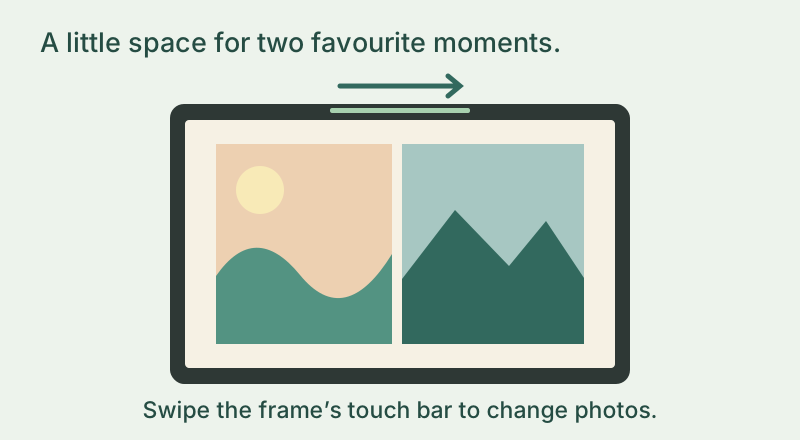
A lovely match if…
- You love a traditional matted look on a shelf or side table.
- Family will keep sending new photos, with no annual storage-plan decision.
Look elsewhere if…
- Your favourite spot needs a portrait-orientation frame.
- You specifically want to tap and crop on the display itself.
When most of your favourite photos are vertical
Baby pictures, a graduation, the dog looking up at you: phones fill up with portrait shots. Carver Mat can pair two on its landscape screen, so the gift can feel more like a little family album. Picture that arrangement before choosing it; two portraits side by side are different from one tall picture filling a vertical frame.
A gift the family can keep adding to
Avoid a recurring-plan decision
Cloud storage is included, so there is no subscription to choose for this model. Keep your original photos backed up separately and enjoy the frame as a way to share them.
Make the gift a shared habit
A birthday, a day out, an ordinary moment worth sharing: relatives can keep the photos coming through the app, email and US/Canada text options. It is a gift the family can keep adding to.
Good to know
Carver Mat stays landscape, but the person enjoying it does not need their phone just to change the photo: swipe the touch bar along the top. Use the app to organise the collection. Choose a different model if you want a screen that stands vertically or controls you tap on the display itself.
The facts that affect your decision
| Display | 10.1-inch, 1280 × 800 |
|---|---|
| Orientation | Landscape only |
| Design | Charcoal/Gravel with paper-like mat |
| Photo pairing | Two portrait photos on one landscape display |
| Subscription | No subscription; cloud storage included |
| Connection | 2.4 GHz WiFi; powered tabletop frame |
Make the first day feel easy
Pick a handful of photos that mean something to them, then arrange the final Wi-Fi setup at their home. Gift preloading prepares the memories; someone still needs to connect the frame. Agree who will send the next few pictures, so it keeps feeling personal after the occasion has passed.
The small setup check
Check the recipient has a suitable 2.4 GHz WiFi network, a nearby power outlet and someone who can help with setup. Choose who sends the first photos and who will keep adding them. Aura offers gift preloading; follow its current instructions rather than assume the recipient needs to set up everything unaided.
Is the simpler plan worth choosing?
Carver Mat makes the most sense when its matted landscape design is the one you actually want. Included storage is a benefit, but it should not talk you into the wrong shape. Compare Frame 2 if touchscreen controls and a changeable outer trim would make the recipient happier.
What will it cost to keep using?
No subscription is listed for this model. Hardware prices and merchant offers can change, so the button opens the exact linked Amazon variant rather than showing a frozen price here. Aura says Gravel and Charcoal packaging describe the same color; still check that the listing is the Mat version.
Quick answers
Can Carver Mat stand in portrait orientation?
No. This model is landscape-only; photo pairing is a way to show portrait pictures within that landscape screen.
Does no subscription mean I should use it as my only photo backup?
Keep the originals backed up separately. The frame is for enjoying and sharing your pictures, alongside your own photo archive.
Is Aura Carver Mat right for your family?
For a family that loves the classic matted look, Carver Mat is an appealing way to bring new memories into the room. Its included storage keeps the plan simple; Frame 2 is worth a look if touch controls and changeable trim matter more.
If it fits your needs, check the exact model and current price on Amazon.